You've seen the button. It's on your saturator, your clipper, your limiter, maybe your amp sim. It says something like 2x or 4x, and clicking it doesn't obviously change anything, so most people either leave it on out of habit or leave it off and never think about it again.
Here's the plain version: oversampling fights aliasing when you're distorting, clipping, or saturating a signal. This post is about that in-plugin button, not the old "more samples means better quality" conversation. We'll cover what it does, which plugins actually benefit, what it costs you, and why higher isn't always better.
TABLE OF CONTENTS
What oversampling actually does
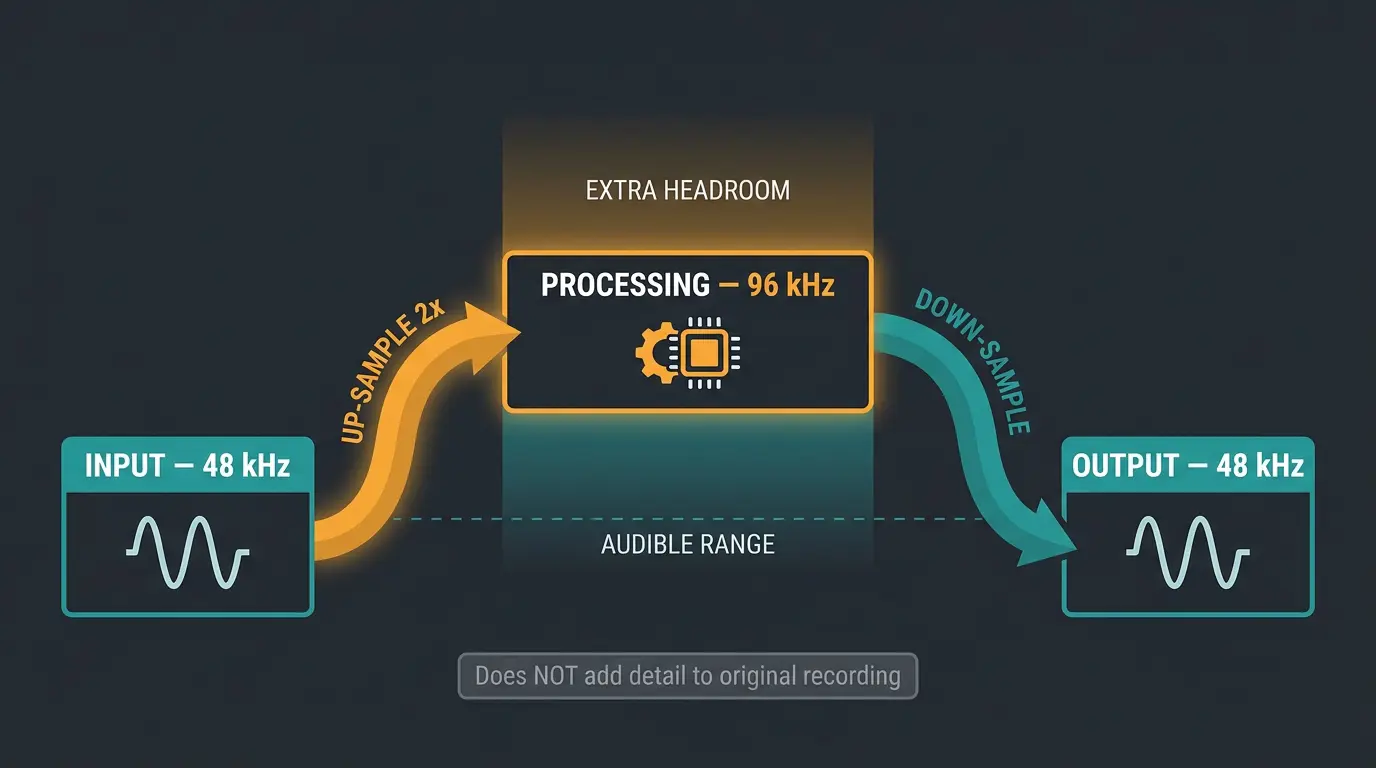
When you turn on oversampling, the plugin takes the incoming signal and up-samples it to a higher rate, does its processing up there, then down-samples it back to your session rate. So if you're running a 48 kHz session at 2x, the plugin is doing its work internally at 96 kHz before handing the audio back at 48 kHz.
Now here's the part that trips people up. It isn't magically capturing your source at twice the rate — the original recording is what it is. What it's really doing is giving the processor more headroom above the audible range to work in. That extra room matters for one specific reason, which we'll get to next.
The real reason it exists: aliasing
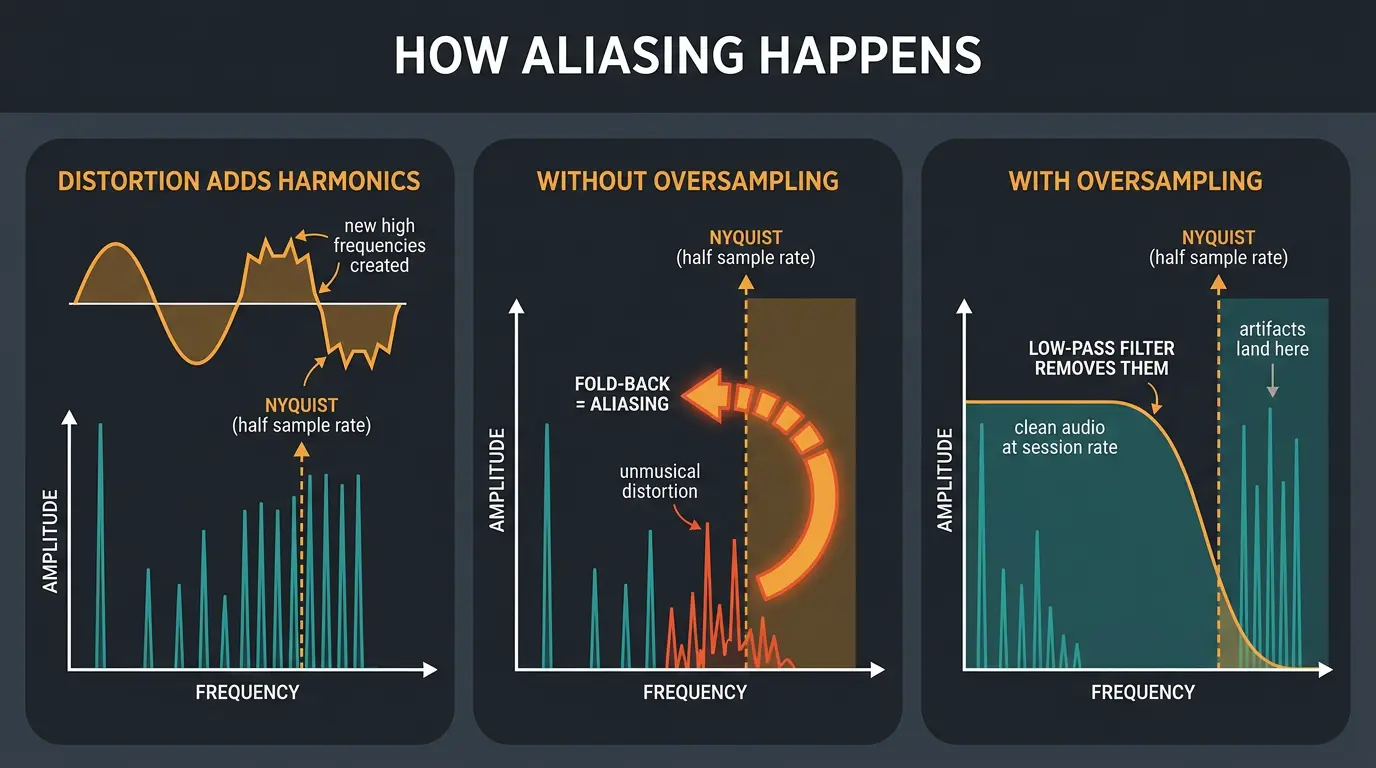
Some kinds of processing create brand-new frequency content. Distortion, clipping, saturation — anything that reshapes the waveform — throws off high frequencies that sit near and above the Nyquist frequency (that's half your sample rate).
When those new frequencies have nowhere to go, they fold back down into the audible range as ugly, unmusical distortion. That folding is aliasing. It doesn't sound like natural harmonics — it sounds off, because the fold-back frequencies aren't related to the notes you're playing.
Oversampling solves this by raising the ceiling. Process at a higher rate and those artifacts land way up high, where a low-pass filter can clean them out before the audio returns to your session rate. There's more going on under the hood too — oversampling can reduce clipping and quantization distortion by encoding the signal more accurately. If you want the deeper technical walkthrough, the folks at Sage Audio have a solid breakdown of oversampling. But aliasing is the headline. That's the reason the button exists.
Which plugins actually benefit
Simple rule: oversampling helps anything that changes the shape of the waveform or creates new frequency content. That covers a lot of the fun stuff.
- Saturators and exciters — they generate harmonics, so they alias.
- Clippers and limiters — hard clipping is about as nonlinear as it gets.
- Compressors — especially aggressive, fast ones.
- Amp sims — distortion is literally the point.
What usually doesn't need it: EQs and time-based effects like delay and reverb. They aren't creating new content in a way that aliases, so oversampling mostly just costs you CPU for nothing. The exception is anything that includes saturation as part of the design — then it's back on the table. If you're stacking saturation plugins, this is worth paying attention to.
One more thing worth knowing. Some developers deliberately let a little aliasing through because it's part of the character they're going for. Others bake oversampling in invisibly, so there's no button at all — it's just always on. So a missing oversampling control isn't always a missing feature.
What it costs you
Oversampling isn't free. It's CPU-hungry and it adds latency. Crank it to 4x or 8x on every plugin in a big session and you can turn a smooth-playing project into a stuttering mess.
And here's the honest part — it's not automatically better. Not all oversampling algorithms are created equal. Some sound great, some don't, and on certain material you might genuinely prefer the sound with it off. Trust your ears on this one. Turn it on, turn it off, and listen for whether it actually cleaned anything up.
There's a nice workflow that gets you the best of both. A lot of developers — TBProAudio, Voxengo, and Kazrog among them — let you run low oversampling while you mix and automatically bump it up only on the final render. Every major DAW supports reporting offline render mode to plugins, so you mix light and render clean. Make sure you check your plugin's manual for whether it offers this.
Filter phase and pre-ringing
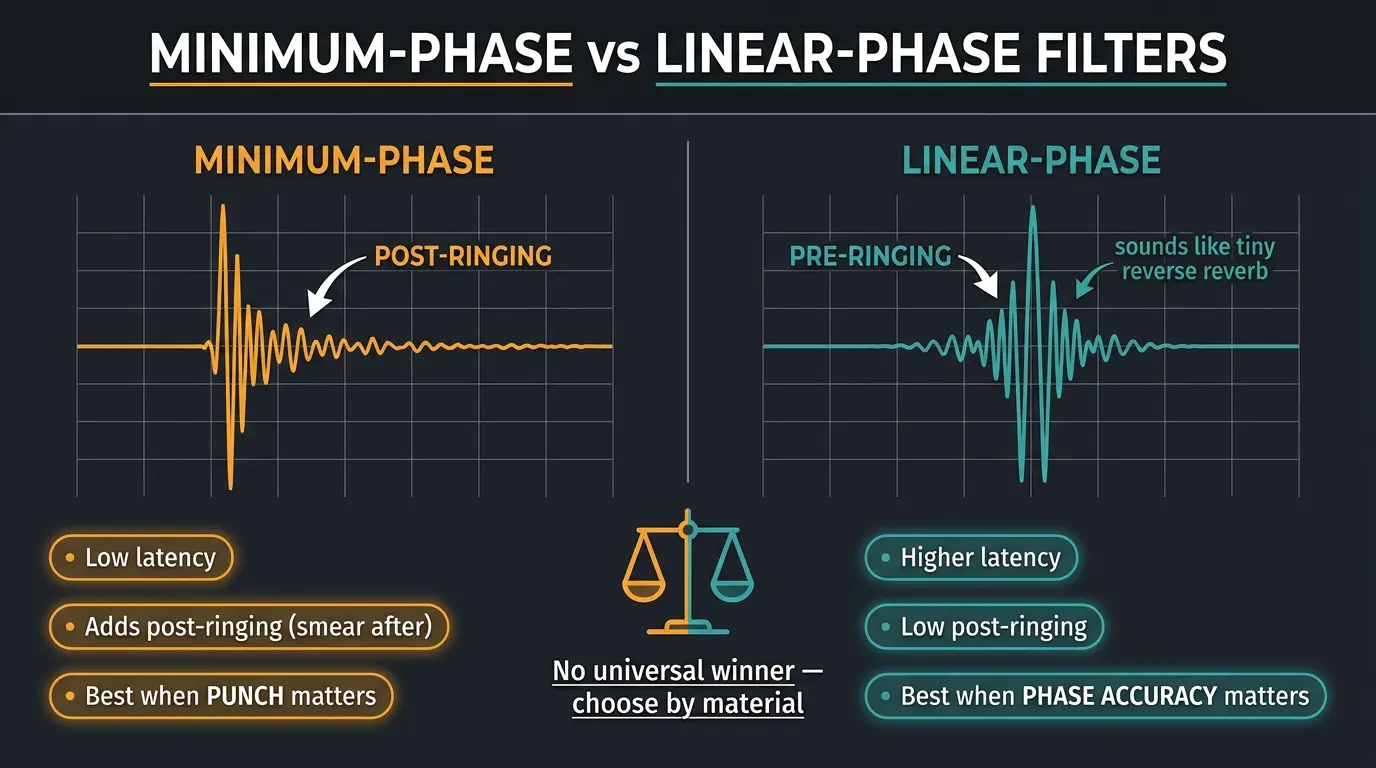
Remember that low-pass filter that cleans up the artifacts before down-sampling? Filters have trade-offs, and this is where a lot of plugins give you a choice between minimum-phase and linear-phase modes.
Minimum-phase filters have low latency, but they tend to add post-ringing — a little smear after the transient. Linear-phase filters keep post-ringing low, but they cost you higher latency and introduce pre-ringing.
Pre-ringing is the one to understand. It's small ripples that show up before a transient, because the algorithm is looking ahead. It sounds like a tiny reverse reverb tacked onto the front of a hit, and it can soften your punch. On drums and percussive material, extreme linear-phase settings can smear those transients and take the life out of them.
So there's no universal winner. Pick your mode by the material — minimum-phase when punch matters, linear-phase when phase accuracy matters more than attack. If phase issues are already on your mind in a mix, our roundup of phase alignment plugins covers the related territory.
How much oversampling do you actually need?
For most work, 2x to 4x covers it. At 44.1 kHz there's not much practical point going past 4x, though you'll find people who'll argue that all day. The gains get smaller and the CPU cost keeps climbing.
To see how far the extreme end goes: some clippers, like SIR Audio Tools StandardCLIP, offer up to 256x. At a 48 kHz session, that's over 12 million samples per second running internally. That's a wild amount of processing for one plugin, and you're not going to need it on your whole mix.
This is where less is more earns its keep. Reach for higher factors only when the material and the processing genuinely call for it — a hot clipper on a loud master, an amp sim pushed hard. Otherwise, keep it modest and save your CPU for the rest of the session.
A quick word on sampling and Nyquist
Quick background, because it explains why the higher internal rate helps. The Nyquist-Shannon theorem says that to faithfully capture a signal, you have to sample at more than twice its highest frequency. Half your sample rate is called the Nyquist frequency, and any content above it folds back down as aliasing.
Human hearing tops out around 20 kHz, which is why the CD landed on 44.1 kHz — enough to cover the audible range with a little margin. The theorem was first described by Harry Nyquist back in 1928 and formalized by Claude Shannon in 1949. Common pro rates today are 44.1, 48, 88.2, and 96 kHz.
Tie it back and it's simple: oversampling temporarily pushes that Nyquist ceiling way up inside the plugin, so the distortion products have somewhere safe to sit before you come back down to your session rate.
Frequently Asked Questions (FAQs)
Does oversampling always improve the sound?
No. Oversampling reduces aliasing during nonlinear processing, but whether it improves the sound depends on the material and the quality of the algorithm. On some sources you'll genuinely prefer it off. Turn it on and off, listen closely, and let your ears make the call rather than assuming higher is better.
Should I oversample an EQ?
Usually not. A clean EQ doesn't create new frequency content, so it doesn't alias and oversampling just costs you CPU for no benefit. The exception is an EQ that includes saturation or drive as part of its design — in that case oversampling can help, since the saturation is the part that aliases.
Does oversampling add latency?
Yes. Oversampling adds latency, and how much depends on the plugin and the filter type it uses. Linear-phase modes add more latency than minimum-phase modes. It also uses more CPU, which is why many people mix at a low setting and render at a higher one.
What's the difference between minimum-phase and linear-phase oversampling?
Minimum-phase oversampling has low latency but adds post-ringing after transients, while linear-phase has low post-ringing but higher latency and pre-ringing before transients. Pre-ringing can soften punch, especially on drums, so minimum-phase is often better for percussive material and linear-phase for phase-critical work.
Is 2x oversampling enough or should I go higher?
For most mixing and mastering work, 2x to 4x is plenty. At 44.1 kHz there's rarely a point going past 4x. If you want maximum quality on a final master, use the mix-low, render-high workflow — keep it modest while working and let it bump up on the final render.
Final Thoughts
Oversampling isn't magic and it isn't a quality knob you crank for free points. It's a targeted tool for one job — keeping distortion products from folding back into your audio when you're reshaping the waveform. Use it on the stuff that creates new content, skip it on the stuff that doesn't, and don't hammer it so high that your session grinds to a halt.
Most of all, listen. Flip it on and off on the plugin in question and hear whether it's actually doing something for you. That habit will teach you more than any spec sheet, and it'll keep your CPU happy while it's at it.
Some of the links within this article are affiliate links. These links are from various companies such as Amazon. This means if you click on any of these links and purchase the item or service, I will receive an affiliate commission. This is at no cost to you and the money gets invested back into Audio Sorcerer LLC.